Private project · IoT · AI · Automation

From sensor data
to intelligence

20+ data sources — MQTT, Zigbee, local APIs and cloud services — flow into one Home Assistant. Automations decide within seconds; Claude explains, warns and double-checks the numbers. A private project that shows what becomes possible when devices, data and AI work together.

20+data sources
~460sensors
~90automations
4AI functions
1 ssmart-meter interval
20 speak-guard cycle
Helmut Krämer
Try it live

Ask my house — Claude answers with live data

Claude
Hi! Ask me anything about Helmut's Home Lab: solar, EV charging, the Jackery battery, the Spitzenwächter or the miners.
⚡ Private project · read-only live data · limited monthly budget
IoT · AI · Automation

Collect. Understand. Act.

Home Assistant runs on a Home Assistant Green and is the hub for everything: devices report locally, cloud services add forecasts and tariffs. AI only reads — every switching decision is made by automations.

1 · IoT: collect

20+ sources over MQTT, Zigbee, local REST/cgminer APIs and cloud services — local first, so everything that switches works without the internet.

MQTTZigbeeRESTCloud

2 · AI: understand

Claude writes a daily house diary, diagnoses miner faults and judges whether mining pays off — on computed values, read-only.

ClaudeStructured outputTool use

3 · Automation: act

~90 automations switch within seconds: a peak guard every 20 s, loads that follow the solar surplus, self-healing. Rules in code, explanations by AI.

pyscriptHome Assistant
LOCAL NETWORK Fronius Solar inverter + smart meter REST API n8n Automations reports · alerts Home Assistant central hub · automations Wattpilot EV charger peak-guard controlled Jackery SolarVault Battery storage via software smart meter Bitaxe Bitcoin miner runs on solar surplus AI chat (Claude) tools on live HA data read-only PV · grid Webhooks charge power grid power on / off REST · Tools
← swipe to explore →
Where the data comes from

MQTT · Zigbee

Jackery SolarVault over MQTT (Mosquitto); motion sensors, door contact, wireless button and lights over Zigbee (ZHA, USB dongle).

MosquittoZHA

Local APIs

Fronius inverter and smart meter (read every second), Wattpilot, Bitaxe (AxeOS REST), Avalon (cgminer API) and Shelly plugs.

RESTcgminerShelly

Cloud

Forecast.Solar, Met.no, Fronius Solar.web, Tuya, Govee, energiedaten.at — plus Braiins, Ocean, CoinGecko and aWATTar for the mining calculation.

Forecast.SolarTuyan8n

Software smart meter

uni-meter pretends to be an EcoTracker meter, fed from the Fronius values. The Jackery regulates to zero export — without extra hardware.

uni-metermDNS

The full list with every source and protocol is in the details below.

Where AI is used

AI explains, warns and double-checks

Claude never switches anything in my house. It reads computed values, explains them in plain language, finds anomalies and answers questions.

1 · My house writes a diary
  • Every evening at 9 pm a pyscript in Home Assistant collects the last 21 days from the recorder statistics: PV, grid import, feed-in, battery, wallbox and holiday home, plus weather and PV forecast. Computed, not estimated.
  • Claude Opus on the Claude Platform writes the entry with structured output (diary, short version, anomalies, a tip per day) and can fetch details itself via three read-only tools — hourly profile, longer series, holiday-home rooms.
  • Claude found the reason for high grid import on its own (night charging of the car) — and once a real bug: two instances of the peak control running in parallel.
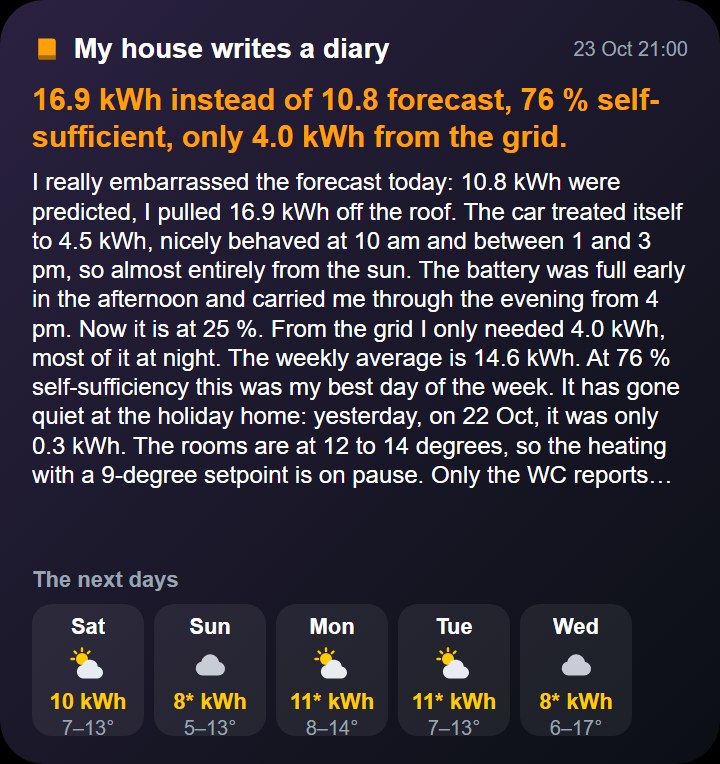
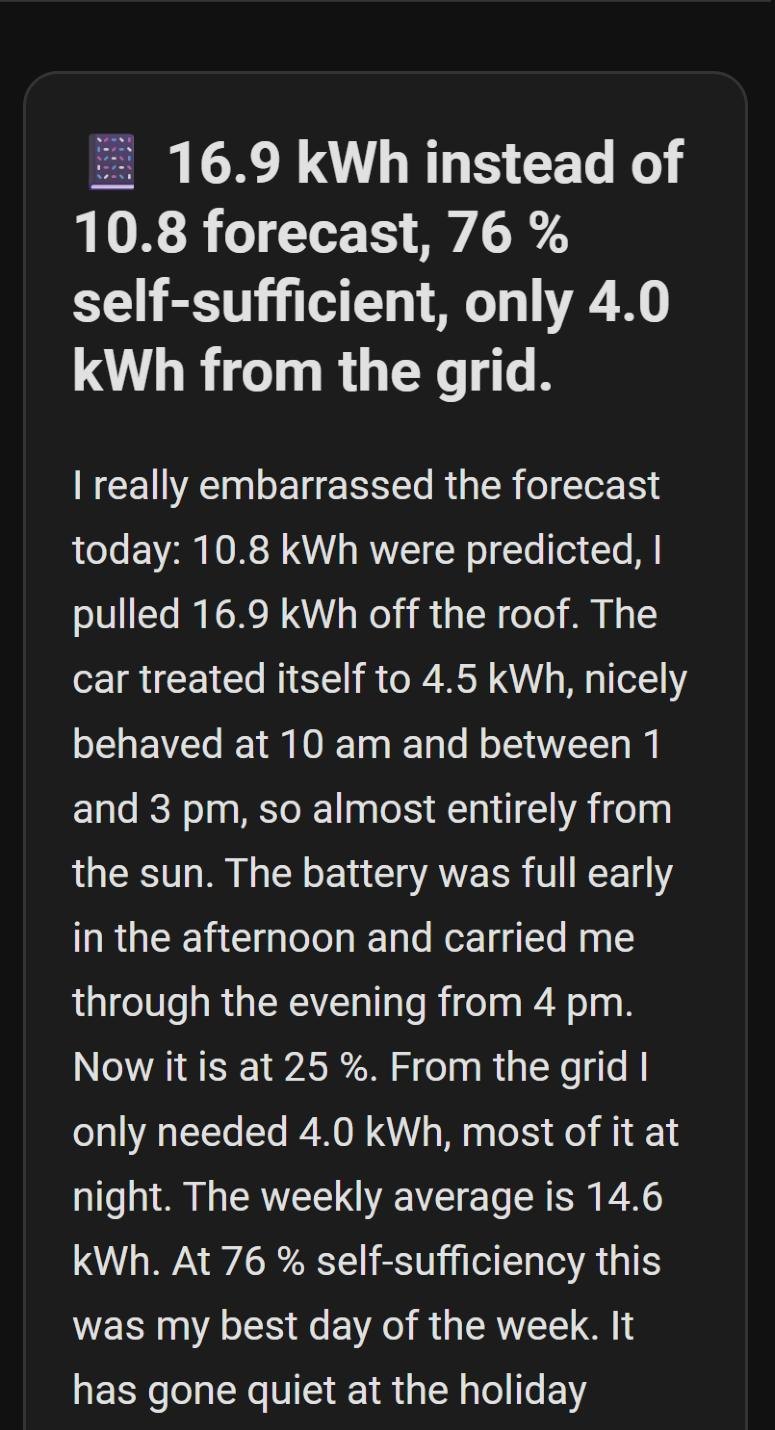
"I really embarrassed the forecast today: 10.8 kWh were predicted, I pulled 16.9 kWh off the roof … at 76 % self-sufficiency that was my best day of the week." Real diary entry from 23 Oct 2026 (written in German by Claude, translated here) — plus, unprompted: "The sensor in the holiday-home WC reads 23.1 °C although nothing is heating. Please check the sensor."
iPhone widget with the diary
The diary as an iPhone widget (translated)
Data sources
Photovoltaics Home battery Wallbox Holiday home Weather + forecast
↓
Collect & calculate · Home Assistant
  • Statistics of the last 21 days
  • Comparison with the weekly average
  • PV outlook calibrated with Forecast.Solar
  • Runs daily at 9 pm — if the switch is on
computed, not estimated
↓ JSON
Write · Claude Platform
  • Structured output — JSON schema instead of text parsing
  • Tool use — fetches details itself when something stands out
  • Prompt caching — system prompt and tools stay the same
  • Own workspace with spend limit, tokens logged per run
tools: read only — Claude can switch nothing
↓
Output
Dashboard iPhone widget Evening push
≈ 7 cents / entry ≈ 21 seconds AI explains · automations decide
2 · AI mining alarm

Every hour while solar power is exported, Home Assistant checks all four miners and the cellar. If the hashrate drops or something runs too hot, an HA AI task hands Claude all values with their normal ranges. Claude writes a diagnosis per device with concrete actions — open the ventilation, throttle the miner, switch it off — as a notification and a phone push "🚨 Mining Alarm".

Bitaxe < 800 / 1600 GH/s Avalon < 4.5 TH/s Chip > 97 °C Cellar > fan threshold +1 °C
3 · Does mining pay off? The data answers

An n8n workflow builds a dashboard on demand and answers one question: would selling the solar power earn more than mining? The cost is counted as opportunity cost — the lost feed-in tariff — not the grid price, because the miners only use surplus.

  • 7 data sources: Home Assistant (power, real runtimes from switch history), Braiins Pool, CoinGecko, Ocean, powermining.io, aWATTar SUNNY (live feed-in tariff) and Claude.
  • Method: power integrated to kWh, day and week from real data, the year projected from the 7-day average — plus a ±30 % BTC price sensitivity.
  • Result today: not profitable — a data-based answer instead of a gut feeling.
  • Paid out so far: 24,620 sats (≈ €17.47).
Mining vs. selling the power
Snapshot 24 Oct 2026 · feed-in tariff 11.8 ct/kWh · BTC €70,963
PV kWhFeed-inMiningDiff.
Today (24 h)1.14€ 0.13€ 0.07€ -0.06
Week7.07€ 0.83€ 0.45€ -0.38
Year (forecast)368.42€ 43.47€ 23.64€ -19.83
Year forecast at other BTC prices
Bearish −30 %
€ 49,674
€ -26.92
Base
€ 70,963
€ -19.83
Bullish +30 %
€ 92,252
€ -12.74
Difference to feed-in over a year, the amount of sats stays the same — only the price changes.
"Mining currently does not pay off: even in the bullish scenario (BTC €92k) the annual forecast shows a loss of about €13, in the base case €20 at −46 % ROI. The main driver is the BTC price, as the hashrate of the small miners is minimal anyway." Claude’s verdict in the dashboard (translated from German).
4 · Building with AI

MCP server

Home Assistant's built-in MCP server lets Claude Code read sensors and work with the house through the Model Context Protocol — privately, with an admin account.

MCPClaude Code

Own Claude Code skill

Most automations, dashboards and custom cards were built together with Claude Code. The know-how is packed into a public Home Assistant skill.

SkillGitHub

This chat

Claude Haiku with one read-only tool over a fixed list of energy sensors and a dedicated non-admin user. It can answer, but never switch.

read-onlyHaiku
Automation · rules in code

Spitzenwächter: guarding the most expensive quarter hour

From 2027, Austrian grid fees for households include a demand charge: the highest quarter hour of the month counts, and above 10 kW each kilowatt costs about twice as much. My analysis showed the limit was exceeded every month since March, with peaks up to 14.6 kW — mostly car plus stove. The Spitzenwächter runs every 20 seconds and projects the current quarter hour forward. If it would exceed 10 kW (with a 0.5 kW margin) it steps in:

  1. 1Throttle the wallbox step by step from 16 A to 6 A, single-phase if needed — the car keeps charging
  2. 2Switch off the pool pump for a moment
  3. 3Switch off the kitchen water heater for a moment
  4. 4Emergency: the home battery helps (down to 30 % SoC)
  5. ↺When things calm down, everything is released step by step

Before going live I simulated it against a re-created charging evening. Estimated saving: around 150 € demand charge per year.

The guard is now an open-source Home Assistant integration that you can install through HACS. To the project page →

Before: over 10 kW every month
Highest grid peak per month in kW — dashed line: 10 kW limit
10 kW
11.5
Mar
11.6
Apr
12.2
May
13.1
Jun
12.6
Jul
14.6
Aug
12.1
Sep
11.8
Oct
Mar–Sep as hourly averages (real quarter hours tend to be higher). Tariffs and start date vary by grid operator, as of Oct 2026.
Field test: car charges at 11 kW, then stove + air fryer
16 Acharging starts
→
10 A+ house
→
6 Astove + air fryer
→
10 Astove off
→
14 → 16 Areleased
  • Quarter hour stayed under 10 kW
  • No charging pause
  • Fully automatic recovery
"My Spitzenwächter had plenty to do from 10:15: it kept throttling the wallbox and switched to single-phase twice … it stayed under 10 kW." From the diary in the evening (Claude, translated from German). Under "Noticed": a duplicate log entry — a real bug the AI spotted before I did.
More rules in code
Pool pump, water heater and miners follow the solar surplus Jackery pauses while the car charges Bitaxe protection at 65 / 75 °C Cellar fan by temperature and sun Self-restart if router and inverter are down Lights by sun position, motion and door
Details

For the technically curious

Every source, device and automation — open what interests you.

All data sources & protocols

Local first: almost everything that switches runs without the internet. Cloud data is only used where nothing local exists.

Source
Data
Protocol
Fronius
PV output, yield, inverter status
Solar API · lokal
Fronius Smart Meter TS 65A-3
Grid import/export per phase, read every second
Solar API · 1 s
Jackery SolarVault 3
State of charge, charge/discharge power, output limit
MQTT · Mosquitto
uni-meter
Emulated grid meter for the Jackery
HTTP · mDNS
Fronius Wattpilot
Charging power, status, charging reason, phases
local API
Bitaxe ×2
Hashrate, temperature, power, shares; pool switching
AxeOS REST
Avalon Nano 3S ×2
Hashrate, chip/exhaust temperature, fan, work mode
cgminer API
Shelly
Plugs, power metering, temperature & humidity
local
Zigbee
Motion sensors, door contact, button, lights
ZHA · USB-Dongle
Govee
Cellar temperature for miners and fan
Bluetooth/Cloud
Tuya
Heating plugs and thermostats in the holiday home
Cloud API
energiedaten.at
Grid operator quarter-hour values (holiday home)
Cloud
Fronius Solar.web
Daily and lifetime energy totals
Cloud
Forecast.Solar · Met.no
PV forecast and 6-day weather
Cloud
Braiins · Ocean · CoinGecko · aWATTar
Pool earnings, BTC price, feed-in tariff (n8n)
REST · Scraping
Anthropic Claude
Diary, mining alarm, ROI assessment, chat
Claude Platform
Nabu Casa
Secure remote access
HA Cloud

Energy: PV, Jackery, EV charging

PV system

A Fronius inverter with a three-phase Smart Meter at the grid connection. The meter is read every second — it is the basis for every surplus decision in the house.

FroniusSmart MeterForecast.Solar

Jackery with a software smart meter

The Jackery SolarVault 3 with an extra battery needs a grid meter for zero-export control. Instead of buying one, the uni-meter add-on emulates an EcoTracker meter from the Fronius values and announces it via mDNS. The battery charges from surplus and discharges exactly what the house draws. Lesson learned: a Shelly Pro 3EM emulation is not detected by the Jackery app — only EcoTracker works.

MQTTuni-meterEcoTrackermDNS

EV charging

The Fronius Wattpilot charges on solar surplus and is throttled by the Spitzenwächter between 16 A and 6 A, single-phase if needed. While the car charges, the Jackery drops to 50 W so the battery does not push its energy into the car. If the car does not charge although the sun is shining, I get an alert.

WattpilotPV surplus

Surplus loads

The pool pump runs from 9 am when PV exceeds 1.5 kW, the kitchen water heater gets a solar pause in fixed time windows, and the miners scale with the surplus. Every switch has wait times and on/off thresholds as adjustable helpers.

ShellyPool pumpHelpers
Solar mining: devices & modes

Four small miners only use power that would otherwise be fed into the grid. Their speed follows the solar surplus, and they protect themselves from overheating.

Bitaxe ×2

Open-source miners with about 1.1 and 2.2 TH/s at 15–30 W. Three modes: pool mining during the day, solar mode on surplus and a "lottery" solo pool at night. HA switches pools and settings over the AxeOS API. Warning at 65 °C, shutdown at 75 °C.

AxeOS RESTPool / Solar / Lottery

Avalon Nano 3S ×2

Up to about 6 TH/s each. The work mode changes with the surplus: Low from 0 W, Mid from 200 W, High from 500 W export. They switch on at 250 or 500 W export and off below 50 W, each after a 10-minute wait, and always start in Low mode.

cgminer APILow / Mid / High

Cellar fan

The miners sit in the cellar. A fan on a smart socket strip switches on when a Govee thermometer reads more than 26 °C, or when there is enough solar power anyway, and switches off after a wait time.

GoveeTuyaTemperature

Pools & payout

Braiins Pool with payout via Lightning, Ocean as an alternative, and a solo "lottery" pool at night where a single found block would pay the full reward.

BraiinsOceanLightning
Lights, climate & self-healing

Lights

Zigbee lights only react between sunset and sunrise: opening the front door turns on the entrance light for 5 minutes, a motion sensor turns on both hallway lamps for 3 minutes, and a wireless button switches them by hand.

ZigbeeZHASun position

Ventilation

A fan switches on when humidity rises above 60 % and off again on its own.

Shelly H&THumidity

Holiday home

Six rooms with heating plugs and thermostats. Modes (off, winter setpoint, weekly schedule) and holiday programmes are written from Home Assistant into the plugs, with a warning if a plug does not confirm. Consumption comes from the grid operator's quarter-hour data.

Tuyaenergiedaten.at

Self-healing

The Netzwächter restarts the Home Assistant host if both the router and the inverter have been unreachable for 10 minutes and reports afterwards. The software smart meter warns on failure and re-registers itself after every restart.

PingWatchdog
Dashboards & widgets (screenshots)

Live energy dashboard

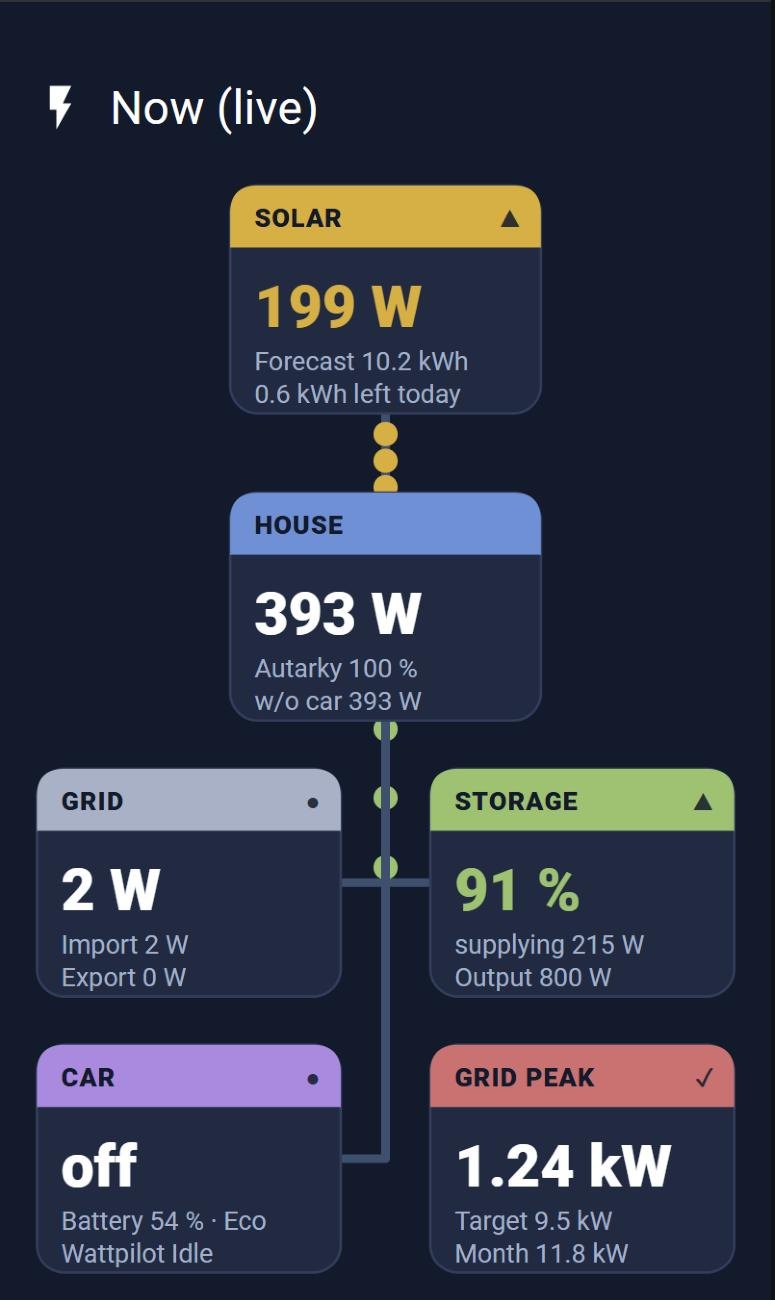
My own energy dashboard with custom-built cards: an animated energy flow map between PV, grid, battery, house and car, and daily totals — in a dark theme.

Custom cardsJavaScriptLovelace

uni-meter dashboard

Shows the emulated meter the Jackery sees, its status and the battery control in one place — so a failure of the software smart meter is visible at once.

uni-meterJackery

Peak dashboard

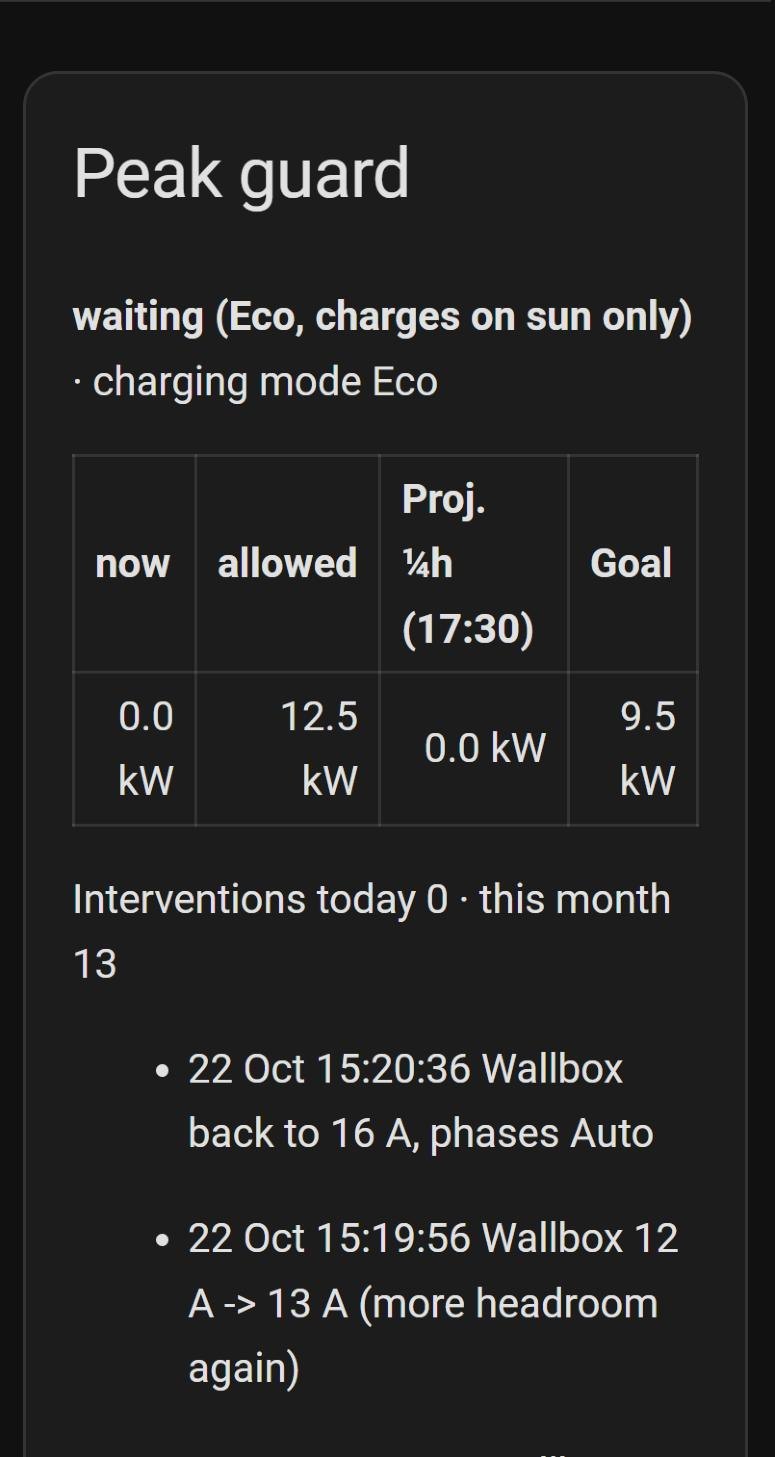
Every quarter hour against the 10 kW limit — it shows the Spitzenwächter at work.

Spitzenwächter

iPhone widgets

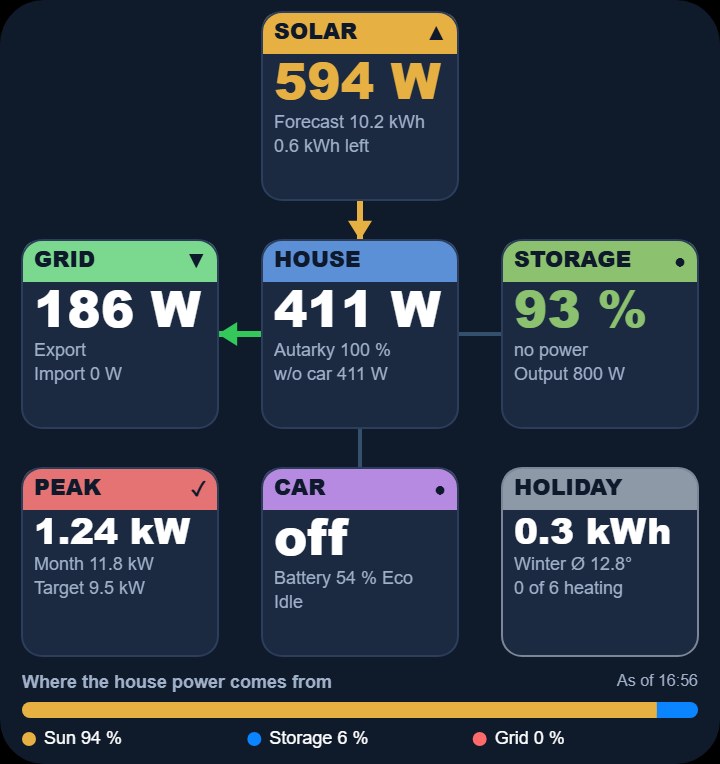
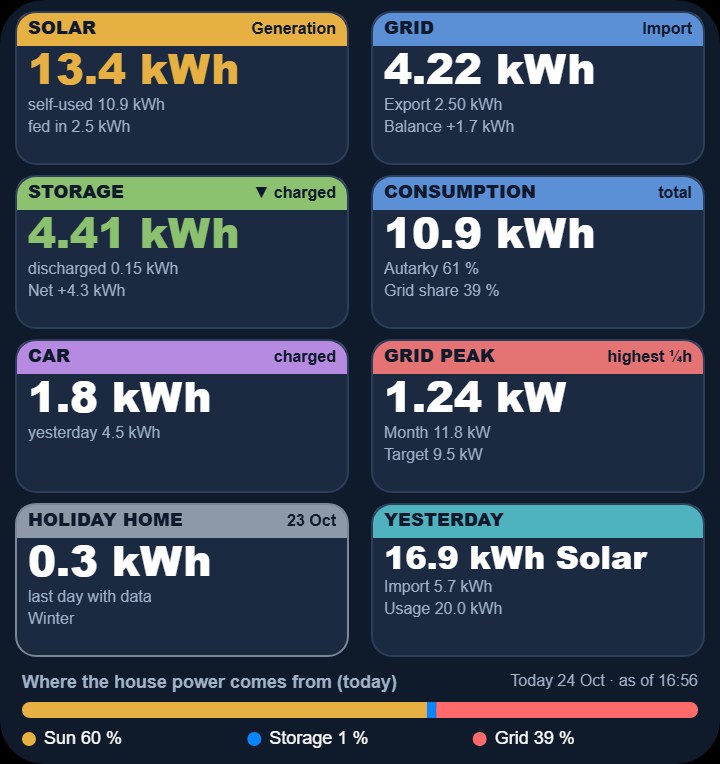
Scriptable widgets on the home screen: today's diary line, the energy flow, daily values and the holiday home — without opening an app.

ScriptableiOS
Live energy: flow between solar, house, grid, battery and car
Spitzenwächter log: wallbox throttled 16 → 12 A and released again
The diary on its dashboard (translated)
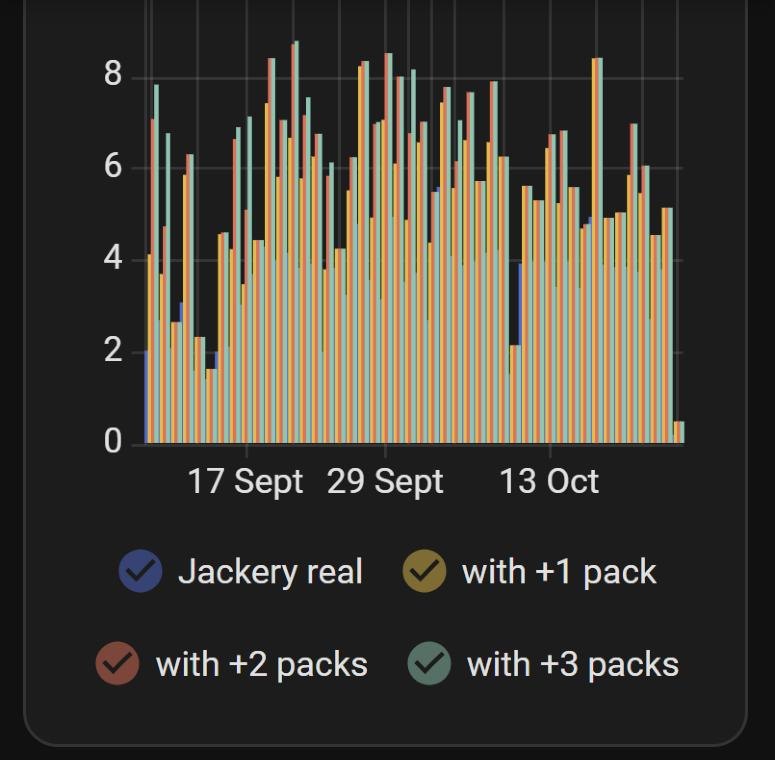
uni-meter long-term view: real battery vs. simulated +1/+2/+3 packs per day
iPhone widgets
iPhone widgets: diary, energy flow and daily values
Diary
iPhone widget · Diary
Energy flow
iPhone widget · Energy flow
Daily values
iPhone widget · Daily values