Home Assistant integration · open source

Keep the most expensive
quarter hour in check

One evening with the car charging and the oven on can set your grid fee for the whole month. The Viertelstunden-Wächter watches your grid import every 20 seconds and keeps each quarter hour below your limit: it throttles the wallbox, pauses flexible loads and gives everything back when there is room again.

open source (AGPL-3.0) local, no cloud no AI needed learns your week German & English 76 tests
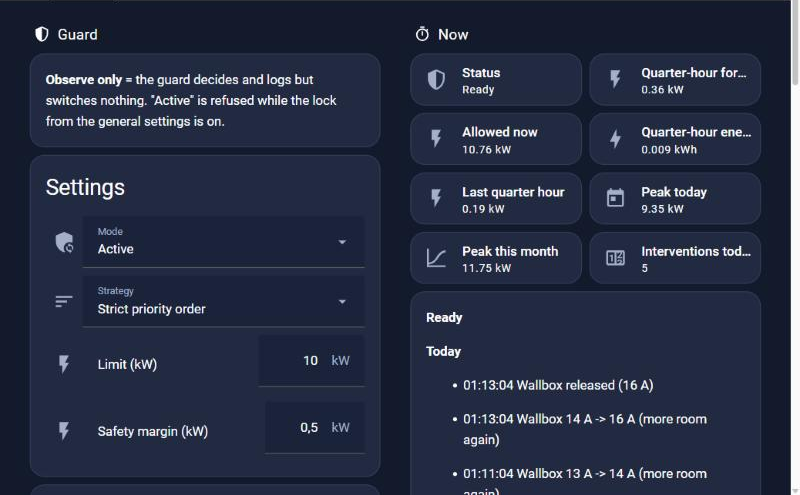
Dashboard of the Viertelstunden-Wächter with status, settings and the log of the day
Why

Power-based grid fees punish the one bad quarter hour

Power-based grid tariffs bill the highest quarter-hour average of the month (in Austria from 2027, elsewhere already). A single evening with the car at 11 kW and the oven on can be enough, and everything below it does not matter for that month. The guard works with an energy budget per quarter hour instead of a hard power cap: short peaks pass, and it steps in only when the quarter hour would really end above the limit.

  • The car keeps charging. The wallbox is only throttled (down to one phase if allowed), never stopped.
  • Priorities, not guesswork. Each device has a priority; the guard picks the cheapest set of measures that is enough.
  • Everything is given back. Stepwise, only with headroom that held for two minutes.
  • Every decision is logged with its reason, in German or English.
The author's house before the guard: over 10 kW every month
Highest grid peak per month in kW, dashed line: 10 kW limit
10 kW
11.5
Mar
11.6
Apr
12.2
May
13.1
Jun
12.6
Jul
14.6
Aug
12.1
Sep
11.8
Oct
Mar–Sep as hourly averages (real quarter hours tend to be higher). Tariffs and start date vary by grid operator, as of Oct 2026.
Field test: car at 11 kW, then oven and stove
16 Acharging
→
12 A+ oven
→
6 A+ stove
→
16 Areleased stepwise
  • Quarter hour stayed below the target
  • Charging never stopped
  • Fully automatic
Real run on the author's installation (October 2026): wallbox at 11 kW, stepwise 16 → 12 → 10 → 8 → 6 A and back.
How it works

Measure, throttle, pause, give back

  1. 1Measure. Every 20 seconds the guard projects the running quarter hour from the meter counter and the current power and computes the power that is still allowed.
  2. 2Throttle. If the quarter hour would end above the limit, the wallbox goes down step by step (16 A → 6 A, optionally to one phase). The car keeps charging.
  3. 3Pause. If that is not enough, flexible loads are paused by priority: pool pump, water heater, heat-pump boost; in an emergency a home battery helps.
  4. 4Give back. As soon as there is headroom that held for two minutes, everything comes back, stepwise and in reverse order. Every step is read back and logged.
Forecast

It knows your week, and acts before the peak

The guard learns the typical grid import for every weekday and quarter hour of the day from your own data, locally and without a cloud. Every finished quarter hour adds a sample to its slot, each slot keeps the latest eight. From that it shows when a peak is likely, so you see the risky evening before it happens.

  • Useful from day one. On the first start the model is filled from the hourly statistics of your import counter (up to 12 weeks). Peaks are underestimated at first and become accurate within a few weeks.
  • Risk windows. A quarter hour counts as a risk if its high value exceeds your target. The next risk and the expected peak of the next 24 hours are shown.
  • House and car apart. If the car is full or not plugged in, the forecast leaves it out, so the usual evening charging is no false alarm.
  • Throttle ahead (optional, off by default). In a risk quarter hour the guard keeps a reserve free and lowers the wallbox current early, only with smooth measures: the car is never stopped, no device is switched off, no phase is switched because of a forecast.
  • Charge plan for the car. Plans when the car should charge to reach its target by departure: sun first if you have a solar forecast, then the quietest quarter hours. If the target cannot be reached, it says so. Carrying the plan out is a separate switch, off by default.
  • Battery reserve and early warning (optional). A home battery can hold its charge for a forecast risk window, and a message warns you before an intervention. Both are off by default.
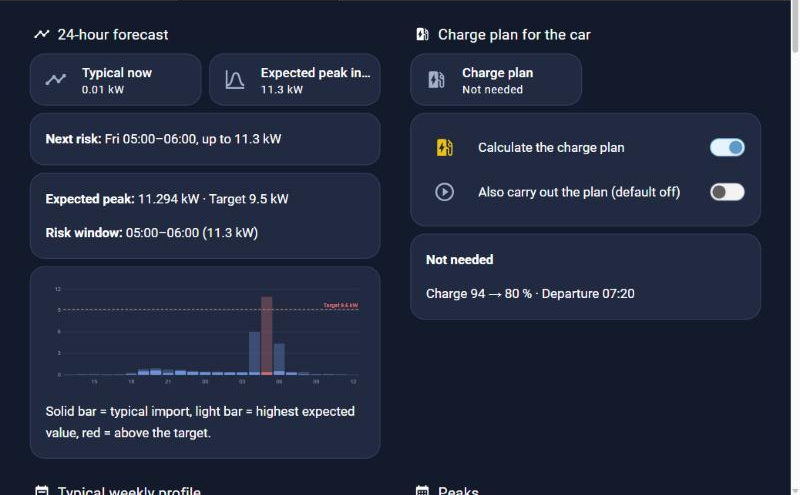
24-hour forecast with a risk window and the charge plan
24-hour forecast: expected peak, the next risk window (here Friday 05:00 to 06:00) and the charge plan.
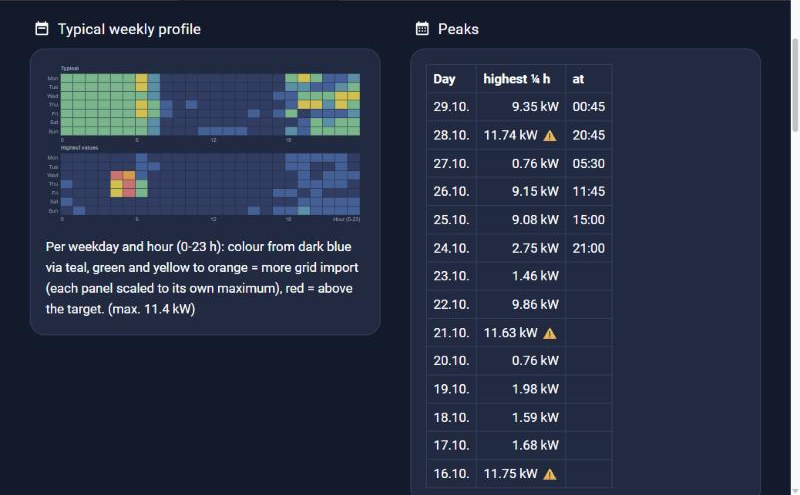
Typical weekly profile by weekday and hour
Weekly profile: the learned pattern by weekday and hour, typical on top, highest values below.
A forecast is an estimate. It is based on your habits and does not know about a spontaneous change. That is why the real-time budget always stays in charge, and every forecast-based action is logged with its reason. Start with throttling ahead switched off, and switch it on once the weekly profile looks right to you.
Screenshots

The real dashboard, from a real day

Taken on 29 October 2026 from the author's installation. The labels come from the integration's English translation, numbers and times are the real ones; the AI explanation was translated from German for this page. The integration itself follows the language of your Home Assistant (German or English).

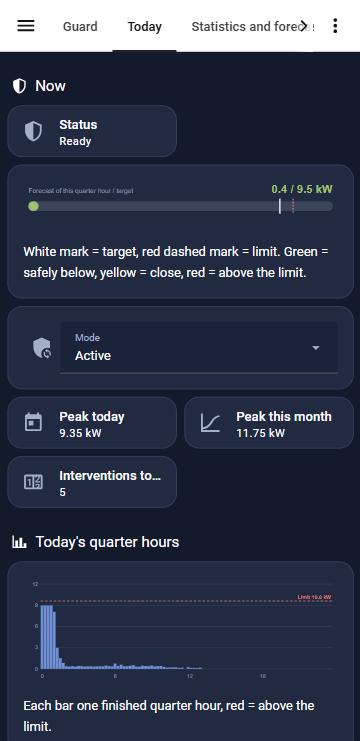
Phone view Today: the running quarter hour against the limit, peaks and interventions at a glance.
Forecast for the next 24 hours with a risk window, and the charge plan for the car.
Weekly profile by weekday and hour, and the highest quarter hour per day (⚠ = above the limit).
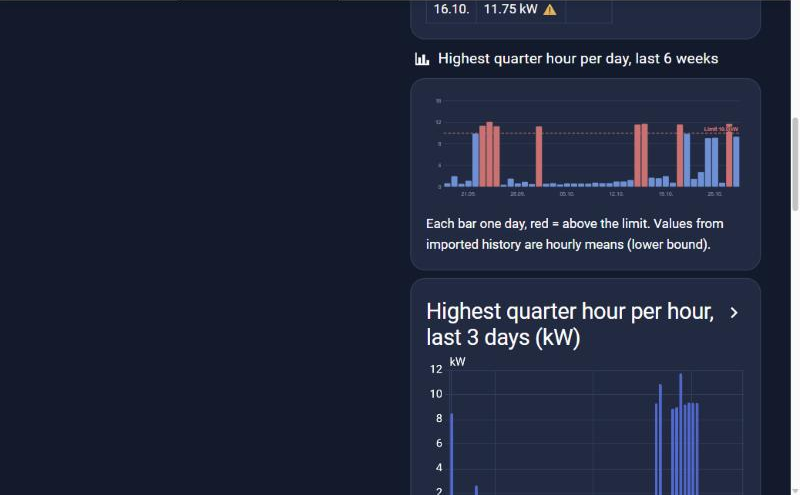
Highest quarter hour per day over six weeks; red = above the limit.
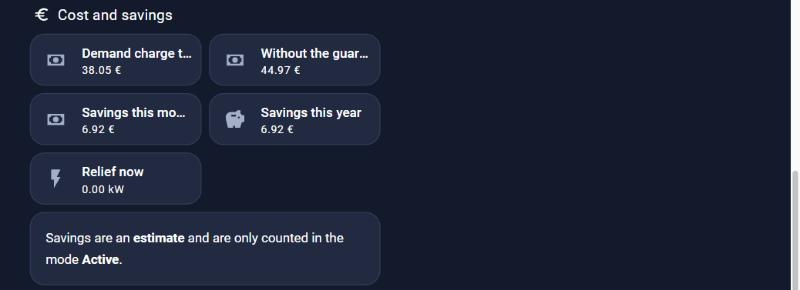
Costs and savings: the demand charge of the month, what it would have been without the guard, and the estimated saving. Prices are yours to enter.
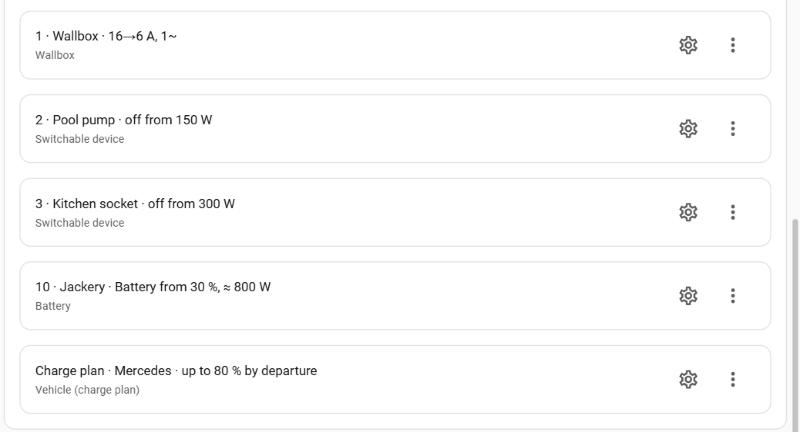
Devices with priorities: wallbox first, then pool pump, kitchen socket, home battery; plus the charge plan for the car. Each entry is added and changed on the integration page.
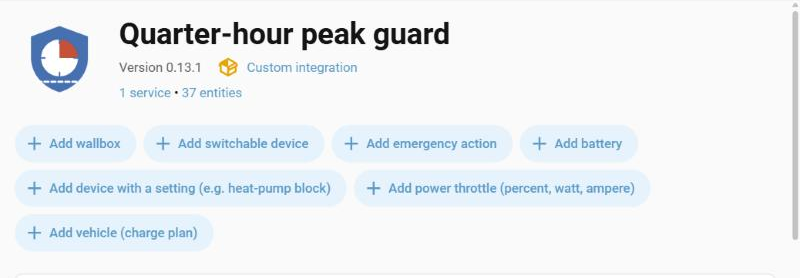
Seven device types to add: wallbox, switchable device, emergency action, battery, device with a setting (for example heat-pump block), power throttle, vehicle.
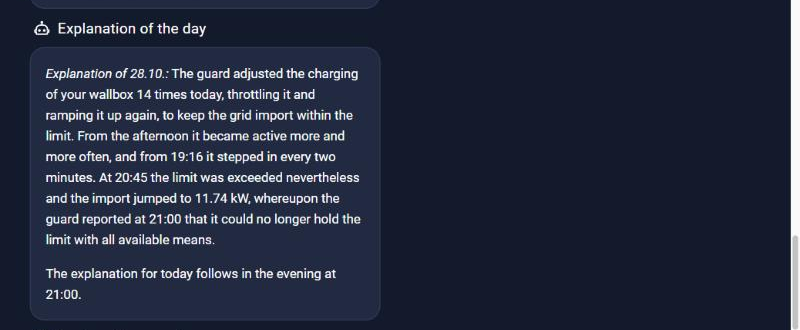
Optional AI explanation of the day: plain words for what the guard did and why, honest also on a day when the limit was exceeded.
Features

What it can do

Energy budget per quarter hour

Projects the running quarter hour every 20 seconds from the meter counter and the current power; intervenes only for the excess.

local20 s

Wallbox, switches, battery, heat pump

Seven device types, brand-neutral: the guard knows roles, not brands. Any wallbox with a settable charging current works.

wallboxbattery

Confirmation of commands

After every real intervention the guard reads the values back after about a minute, repeats once, reports, and uses the next measure if it did not work.

Forecast and charge plan

Learns the load per weekday and quarter hour, shows risk windows, and plans when the car should charge using the solar forecast of the Energy dashboard (display only by default).

optional

Costs and savings

Shows the demand charge of the month and an estimate of what the guard saved. The prices are yours to enter.

Messages, report, CSV, AI explanation

Push on intervention, early warning, weekly report, CSV export, and an optional AI explanation of the day through a Home Assistant AI task. Dashboard and log in German or English.

DEENAI optional
Who it is for

Three ways to use it

Home owners with a wallbox

Install it through HACS, start in observe mode, switch to active after a few days. Free for your own home.AGPL-3.0 · free

Installers and energy consultants

Set it up for customers on their Home Assistant, with a ready-made dashboard and a CSV export for the customer conversation. Your own changes stay open under the AGPL, or you take a licence.AGPL or commercial

Manufacturers and platforms

Bundle the guard with a wallbox, gateway or energy platform, or run it as part of a closed-source service, without the AGPL obligations. Terms are agreed individually.commercial licence

Energy communities

We would be glad to build an add-on with an integration for your energy community. Tell us what your community needs and we will work out together what is possible.get in touch

Safety and quality

Built to be switched on, and to be switched off

Observe mode first

It decides and logs, but switches nothing. You see what it would have done before it does anything.

Gives everything back

Missing readings, a restart or switching the guard off give back everything it changed, and only what it changed itself.

Tested

76 unit tests with a house simulation, an installation test on a fresh Home Assistant, hassfest and HACS validation in every build.

No replacement for electrical safety. The guard is no substitute for fuses or the load management required by electrical codes, and no tariff calculator.
What you need

A fast grid measurement

Two sensors in Home Assistant: the grid import power (updated every few seconds) and, recommended, the grid import energy counter. The grid operator's web portal does not work, its values arrive the next day.

Source
Details
Quality
Smart-meter interface
Customer interface of the utility meter via ESPHome or MQTT
about 1 value / s: best
Inverter meter
Meter at the grid connection point (Fronius, SMA, Huawei, SolarEdge …)
every 1–10 s: good
Meter in the board
3-phase energy meter via its integration or Modbus
every few s: good
Install

In five minutes via HACS

  1. 1In HACS: ⋮ → Custom repositories → add the address below, category Integration
  2. 2Download "Viertelstunden-Wächter", restart Home Assistant
  3. 3Settings → Devices & services → Add integration → Viertelstunden-Wächter
  4. 4Set sensors and limit, add your devices (wallbox, loads), start in observe mode
  5. 5After a few days switch to Active. The service create_dashboard builds the dashboard.
https://github.com/mobilewhatelse/viertelstunden-waechter
Honest status. Version 0.13, used daily on one installation (a Fronius Wattpilot wallbox and a Jackery home battery). Other devices are checked in the source code of their integrations and listed in the compatibility table; reports from other installations are very welcome. Requires Home Assistant 2026.3 or newer.

Compatibility list ↗ · Documentation ↗ · Releases ↗

Licence

Free for your home, commercial licence for products

AGPL-3.0 · free

Private use in your own home, sharing, studying and changing the code. If you distribute a modified version or offer it to others as a network service, you must publish your complete source under the AGPL-3.0 as well.

Commercial licence

For using the guard in a product or service without the AGPL obligations: bundled with hardware, a gateway or an installation package you sell; part of a closed-source platform or a service for customers; your own changes kept private. Terms are agreed individually.

on request
Contact

Try it, talk to me, or get a licence

Installers, energy companies, energy communities, wallbox and inverter makers: I am happy to talk about a commercial licence, an integration or an add-on built for you. Home Assistant users: bug reports and device test reports are best placed as an issue on GitHub.